
TopoSnap feature wiki
Find commands, workflows and support boundaries. Browse feature guides, aliases for 127 commands and real captured examples.
127 commands
Quick reference
Expand a command to read its usage, aliases and scope. Entry links open the relevant command directly.
Public downloads: Windows v1.5.35 · Ubuntu 26.04 amd64 v1.5.36. Command captures show v1.5.35; support depends on the installed version and input objects.
No entries match. Try another command or alias, or change the category.
DWG · DXF · external references
Open and edit existing drawings with layers, blocks and external references. Use a copy to check display, editing and saved results before working on an important file. Bring the fonts and reference files used by the drawing.
Support depends on file version and object type. Check the linked file path if an external reference is missing.
Keep the fonts used in your drawings.
Review and approve your own SHX fonts for import and vector display of supported characters. Compatibility varies by font and character; check your rights to use external fonts.
Copy repeatedly. Stretch selected parts.
Place repeated copies with CO (COPY) and stretch parts inside a crossing selection with S (STRETCH). Stretch selected line endpoints and polyline vertices, and preserve block structure when copying.
Check for new versions in the app.
The app checks the server for version metadata, release notes and a checksum. This displays update information and does not automatically download or install updates.
Prepare your own plotting styles.
CTBCREATE creates and saves color, monochrome and grayscale CTB presets alongside the existing CTB import workflow.
LISP
Supports selected AutoLISP syntax and CAD host APIs: SETQ, DEFUN, IF, WHILE; DISTANCE, ANGLE, POLAR, TRANS; SSGET, SSLENGTH, SSNAME, ENTGET, ENTMOD, ENTMAKE, ENTMAKEX; and COMMAND/COMMAND-S. Supported objects and input forms vary by API. Compatibility with VLA-/VLAX- Visual LISP/ActiveX APIs and protected binary LISP is not guaranteed.
Windows · Ubuntu installation guide ↗Place your drawing on the sheet.
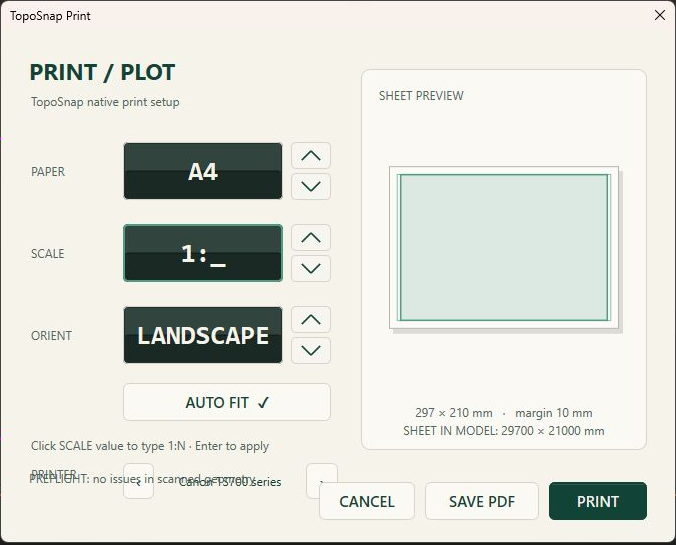
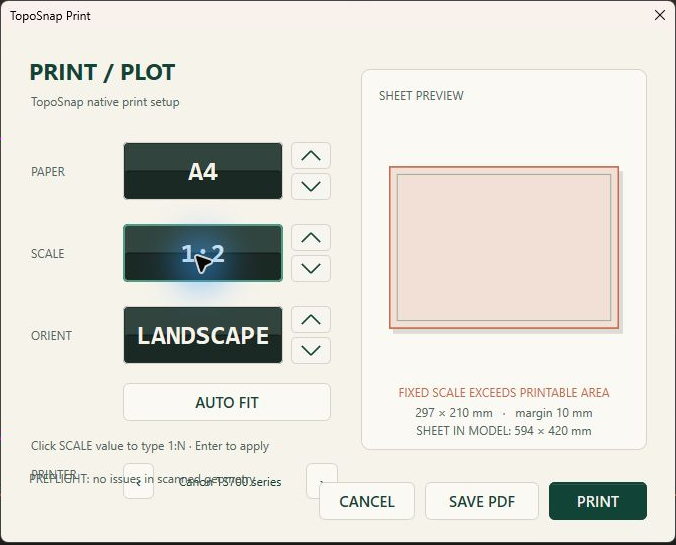
Choose A0–A4 paper and orientation in print setup, then enter a scale or use automatic fit. Paper, orientation and scale changes resize the print region while preserving its anchor. Review sheet dimensions and margins in the preview, and save frequently used settings with PLOTPRESET.
PAPER (PP) creates an A3 landscape boundary on a locked PAPER layer. Adjust the print region through PLOT print setup.
Draw 12 commands
ARCDraw: ARC
- Command
ARC- Aliases
- AC
- Category
- Draw
- Status
- Listed in the command catalog
How to use
Enter the command or one of its aliases, then follow the prompts shown in the app.
Scope
Results can depend on input objects and file formats. Check important drawings using a copy.
CIRCLEDraw: CIRCLE
- Command
CIRCLE- Aliases
- CI|CIR
- Category
- Draw
- Status
- Listed in the command catalog
How to use
Enter the command or one of its aliases, then follow the prompts shown in the app.
Scope
Results can depend on input objects and file formats. Check important drawings using a copy.
CURVECreate a semantic curve and render it through adaptive tessellation.
- Command
CURVE- Aliases
- C
- Category
- Draw
- Status
- Listed in the command catalog
How to use
Enter the command or one of its aliases, then follow the prompts shown in the app.
Scope
Results can depend on input objects and file formats. Check important drawings using a copy.
HATCHCreate or process hatch geometry and boundaries.
- Command
HATCH- Aliases
- H
- Category
- Draw
- Status
- Listed in the command catalog
How to use
Enter the command or one of its aliases, then follow the prompts shown in the app.
Scope
Results can depend on input objects and file formats. Check important drawings using a copy.
LINEDraw: LINE
- Command
LINE- Aliases
- L
- Category
- Draw
- Status
- Listed in the command catalog
How to use
Enter the command or one of its aliases, then follow the prompts shown in the app.
Scope
Results can depend on input objects and file formats. Check important drawings using a copy.
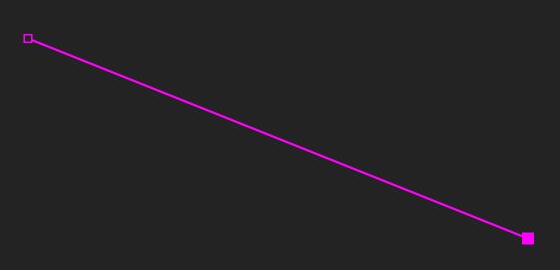
MTEXTDraw: MTEXT
- Command
MTEXT- Aliases
- MT
- Category
- Draw
- Status
- Listed in the command catalog
How to use
Enter the command or one of its aliases, then follow the prompts shown in the app.
Scope
Results can depend on input objects and file formats. Check important drawings using a copy.
PLANARSRFDraw: PLANARSRF
- Command
PLANARSRF- Aliases
- PSRF|PLANARSURFACE
- Category
- Draw
- Status
- Listed in the command catalog
How to use
Enter the command or one of its aliases, then follow the prompts shown in the app.
Scope
Results can depend on input objects and file formats. Check important drawings using a copy.
PLANEDraw: PLANE
- Command
PLANE- Aliases
- -
- Category
- Draw
- Status
- Listed in the command catalog
How to use
Enter the command or one of its aliases, then follow the prompts shown in the app.
Scope
Results can depend on input objects and file formats. Check important drawings using a copy.
POLYLINEDraw: POLYLINE
- Command
POLYLINE- Aliases
- PL|PLINE
- Category
- Draw
- Status
- Listed in the command catalog
How to use
Enter the command or one of its aliases, then follow the prompts shown in the app.
Scope
Results can depend on input objects and file formats. Check important drawings using a copy.
RECTANGLEDraw: RECTANGLE
- Command
RECTANGLE- Aliases
- REC|RECT
- Category
- Draw
- Status
- Listed in the command catalog
How to use
Enter the command or one of its aliases, then follow the prompts shown in the app.
Scope
Results can depend on input objects and file formats. Check important drawings using a copy.
REVCLOUDDraw: REVCLOUD
- Command
REVCLOUD- Aliases
- RC|REVC
- Category
- Draw
- Status
- Listed in the command catalog
How to use
Enter the command or one of its aliases, then follow the prompts shown in the app.
Scope
Results can depend on input objects and file formats. Check important drawings using a copy.
TEXTDraw: TEXT
- Command
TEXT- Aliases
- -
- Category
- Draw
- Status
- Listed in the command catalog
How to use
Enter the command or one of its aliases, then follow the prompts shown in the app.
Scope
Results can depend on input objects and file formats. Check important drawings using a copy.
Modify 15 commands
CHAMFERModify: CHAMFER
- Command
CHAMFER- Aliases
- CHA
- Category
- Modify
- Status
- Listed in the command catalog
How to use
Enter the command or one of its aliases, then follow the prompts shown in the app.
Scope
Results can depend on input objects and file formats. Check important drawings using a copy.
DELETEModify: DELETE
- Command
DELETE- Aliases
- DEL|ERASE|E
- Category
- Modify
- Status
- Listed in the command catalog
How to use
Enter the command or one of its aliases, then follow the prompts shown in the app.
Scope
Results can depend on input objects and file formats. Check important drawings using a copy.
EXPLODEDetach selected top-level block instances into editable primitives.
- Command
EXPLODE- Aliases
- X|EXP
- Category
- Modify
- Status
- Listed in the command catalog
How to use
Enter the command or one of its aliases, then follow the prompts shown in the app.
Scope
Results can depend on input objects and file formats. Check important drawings using a copy.
FILLETCreate a tangent fillet using sticky radius and near-end selection.
- Command
FILLET- Aliases
- F
- Category
- Modify
- Status
- Listed in the command catalog
How to use
Enter the command or one of its aliases, then follow the prompts shown in the app.
Scope
Results can depend on input objects and file formats. Check important drawings using a copy.
JOINModify: JOIN
- Command
JOIN- Aliases
- J
- Category
- Modify
- Status
- Listed in the command catalog
How to use
Enter the command or one of its aliases, then follow the prompts shown in the app.
Scope
Results can depend on input objects and file formats. Check important drawings using a copy.
MATCHPROPERTIESModify: MATCHPROPERTIES
- Command
MATCHPROPERTIES- Aliases
- MA|MATCHPROP
- Category
- Modify
- Status
- Listed in the command catalog
How to use
Enter the command or one of its aliases, then follow the prompts shown in the app.
Scope
Results can depend on input objects and file formats. Check important drawings using a copy.
MIRRORModify: MIRROR
- Command
MIRROR- Aliases
- -
- Category
- Modify
- Status
- Listed in the command catalog
How to use
Enter the command or one of its aliases, then follow the prompts shown in the app.
Scope
Results can depend on input objects and file formats. Check important drawings using a copy.
MOVEModify: MOVE
- Command
MOVE- Aliases
- M
- Category
- Modify
- Status
- Listed in the command catalog
How to use
Enter the command or one of its aliases, then follow the prompts shown in the app.
Scope
Results can depend on input objects and file formats. Check important drawings using a copy.
OFFSETModify: OFFSET
- Command
OFFSET- Aliases
- O|OF
- Category
- Modify
- Status
- Listed in the command catalog
How to use
Enter the command or one of its aliases, then follow the prompts shown in the app.
Scope
Results can depend on input objects and file formats. Check important drawings using a copy.
ROTATEModify: ROTATE
- Command
ROTATE- Aliases
- RO
- Category
- Modify
- Status
- Listed in the command catalog
How to use
Enter the command or one of its aliases, then follow the prompts shown in the app.
Scope
Results can depend on input objects and file formats. Check important drawings using a copy.
SCALEModify: SCALE
- Command
SCALE- Aliases
- SC
- Category
- Modify
- Status
- Listed in the command catalog
How to use
Enter the command or one of its aliases, then follow the prompts shown in the app.
Scope
Results can depend on input objects and file formats. Check important drawings using a copy.
SPLITModify: SPLIT
- Command
SPLIT- Aliases
- -
- Category
- Modify
- Status
- Listed in the command catalog
How to use
Enter the command or one of its aliases, then follow the prompts shown in the app.
Scope
Results can depend on input objects and file formats. Check important drawings using a copy.
STRETCHModify: STRETCH
- Command
STRETCH- Aliases
- S
- Category
- Modify
- Status
- Listed in the command catalog
How to use
Enter the command or one of its aliases, then follow the prompts shown in the app.
Scope
Results can depend on input objects and file formats. Check important drawings using a copy.
TRIMModify: TRIM
- Command
TRIM- Aliases
- TR
- Category
- Modify
- Status
- Listed in the command catalog
How to use
Enter the command or one of its aliases, then follow the prompts shown in the app.
Scope
Results can depend on input objects and file formats. Check important drawings using a copy.
COPYCopy objects repeatedly
- Command
COPY- Aliases
- CO
- Category
- Modify
- Status
- Listed in the command catalog
How to use
Enter the command or one of its aliases, then follow the prompts shown in the app.
Scope
Results can depend on input objects and file formats. Check important drawings using a copy.
Measure and dimension 8 commands
ANGLEMeasure angles
- Command
ANGLE- Aliases
- ANG
- Category
- Measure and dimension
- Status
- Listed in the command catalog
How to use
Enter the command or one of its aliases, then follow the prompts shown in the app.
Scope
Results can depend on input objects and file formats. Check important drawings using a copy.
AREAMeasure area
- Command
AREA- Aliases
- A|AA
- Category
- Measure and dimension
- Status
- Listed in the command catalog
How to use
Enter the command or one of its aliases, then follow the prompts shown in the app.
Scope
Results can depend on input objects and file formats. Check important drawings using a copy.
SECTIONMOMENTCalculate area, centroid and second moments of a closed section
- Command
SECTIONMOMENT- Aliases
- I|SECMOMENT
- Category
- Measure and dimension
- Status
- Listed in the command catalog
How to use
Enter the command or one of its aliases, then follow the prompts shown in the app.
Scope
Results can depend on input objects and file formats. Check important drawings using a copy.
BOUNDINGBOXInspect object bounding boxes
- Command
BOUNDINGBOX- Aliases
- BBOX
- Category
- Measure and dimension
- Status
- Listed in the command catalog
How to use
Enter the command or one of its aliases, then follow the prompts shown in the app.
Scope
Results can depend on input objects and file formats. Check important drawings using a copy.
DIMCreate dimensions
- Command
DIM- Aliases
- DI
- Category
- Measure and dimension
- Status
- Listed in the command catalog
How to use
Enter the command or one of its aliases, then follow the prompts shown in the app.
Scope
Results can depend on input objects and file formats. Check important drawings using a copy.
DIMANGLECreate angular dimensions
- Command
DIMANGLE- Aliases
- DAN
- Category
- Measure and dimension
- Status
- Listed in the command catalog
How to use
Enter the command or one of its aliases, then follow the prompts shown in the app.
Scope
Results can depend on input objects and file formats. Check important drawings using a copy.
DIMSTYLESet dimension styles
- Command
DIMSTYLE- Aliases
- D|DS
- Category
- Measure and dimension
- Status
- Listed in the command catalog
How to use
Enter the command or one of its aliases, then follow the prompts shown in the app.
Scope
Results can depend on input objects and file formats. Check important drawings using a copy.
LENGTHMeasure length
- Command
LENGTH- Aliases
- LEN
- Category
- Measure and dimension
- Status
- Listed in the command catalog
How to use
Enter the command or one of its aliases, then follow the prompts shown in the app.
Scope
Results can depend on input objects and file formats. Check important drawings using a copy.
Blocks 8 commands
BCLOSELeave the current block edit context.
- Command
BCLOSE- Aliases
- BC
- Category
- Blocks
- Status
- Listed in the command catalog
How to use
Enter the command or one of its aliases, then follow the prompts shown in the app.
Scope
Results can depend on input objects and file formats. Check important drawings using a copy.
BLOCKBlocks: BLOCK
- Command
BLOCK- Aliases
- -
- Category
- Blocks
- Status
- Listed in the command catalog
How to use
Enter the command or one of its aliases, then follow the prompts shown in the app.
Scope
Results can depend on input objects and file formats. Check important drawings using a copy.
BLOCKEDITEnter block edit context for the selected instance.
- Command
BLOCKEDIT- Aliases
- BEDIT|BE
- Category
- Blocks
- Status
- Listed in the command catalog
How to use
Enter the command or one of its aliases, then follow the prompts shown in the app.
Scope
Results can depend on input objects and file formats. Check important drawings using a copy.
BLOCKTREEBrowse the current BlockManager definition and instance hierarchy.
- Command
BLOCKTREE- Aliases
- BT
- Category
- Blocks
- Status
- Listed in the command catalog
How to use
Enter the command or one of its aliases, then follow the prompts shown in the app.
Scope
Results can depend on input objects and file formats. Check important drawings using a copy.
EXGToggle precision grid during block editing
- Command
EXG- Aliases
- -
- Category
- Blocks
- Status
- Listed in the command catalog
How to use
Enter the command or one of its aliases, then follow the prompts shown in the app.
Scope
Results can depend on input objects and file formats. Check important drawings using a copy.
XREFEDITEnter clipped external-reference edit context for the selected XREF block.
- Command
XREFEDIT- Aliases
- XRE|REFEDIT
- Category
- Blocks
- Status
- Listed in the command catalog
How to use
Enter the command or one of its aliases, then follow the prompts shown in the app.
Scope
Results can depend on input objects and file formats. Check important drawings using a copy.
XRCLOSELeave the current XREF edit context.
- Command
XRCLOSE- Aliases
- -
- Category
- Blocks
- Status
- Listed in the command catalog
How to use
Enter the command or one of its aliases, then follow the prompts shown in the app.
Scope
Results can depend on input objects and file formats. Check important drawings using a copy.
XCLIPSet or toggle the XREF edit clipping boundary.
- Command
XCLIP- Aliases
- XC
- Category
- Blocks
- Status
- Listed in the command catalog
How to use
Enter the command or one of its aliases, then follow the prompts shown in the app.
Scope
Results can depend on input objects and file formats. Check important drawings using a copy.
Layers 9 commands
ISOLATELayers: ISOLATE
- Command
ISOLATE- Aliases
- IS
- Category
- Layers
- Status
- Listed in the command catalog
How to use
Enter the command or one of its aliases, then follow the prompts shown in the app.
Scope
Results can depend on input objects and file formats. Check important drawings using a copy.
LAYEROpen layer operations including rename and state changes.
- Command
LAYER- Aliases
- LA|-LAYER
- Category
- Layers
- Status
- Listed in the command catalog
How to use
Enter the command or one of its aliases, then follow the prompts shown in the app.
Scope
Results can depend on input objects and file formats. Check important drawings using a copy.
LAYERADDLayers: LAYERADD
- Command
LAYERADD- Aliases
- -
- Category
- Layers
- Status
- Listed in the command catalog
How to use
Enter the command or one of its aliases, then follow the prompts shown in the app.
Scope
Results can depend on input objects and file formats. Check important drawings using a copy.
LAYERADDMULTILayers: LAYERADDMULTI
- Command
LAYERADDMULTI- Aliases
- LAA
- Category
- Layers
- Status
- Listed in the command catalog
How to use
Enter the command or one of its aliases, then follow the prompts shown in the app.
Scope
Results can depend on input objects and file formats. Check important drawings using a copy.
LAYERDELETELayers: LAYERDELETE
- Command
LAYERDELETE- Aliases
- -
- Category
- Layers
- Status
- Listed in the command catalog
How to use
Enter the command or one of its aliases, then follow the prompts shown in the app.
Scope
Results can depend on input objects and file formats. Check important drawings using a copy.
LAYERDELETEMULTILayers: LAYERDELETEMULTI
- Command
LAYERDELETEMULTI- Aliases
- LAD
- Category
- Layers
- Status
- Listed in the command catalog
How to use
Enter the command or one of its aliases, then follow the prompts shown in the app.
Scope
Results can depend on input objects and file formats. Check important drawings using a copy.
LOCKLayers: LOCK
- Command
LOCK- Aliases
- K
- Category
- Layers
- Status
- Listed in the command catalog
How to use
Enter the command or one of its aliases, then follow the prompts shown in the app.
Scope
Results can depend on input objects and file formats. Check important drawings using a copy.
UNISOLATELayers: UNISOLATE
- Command
UNISOLATE- Aliases
- US
- Category
- Layers
- Status
- Listed in the command catalog
How to use
Enter the command or one of its aliases, then follow the prompts shown in the app.
Scope
Results can depend on input objects and file formats. Check important drawings using a copy.
UNLOCKLayers: UNLOCK
- Command
UNLOCK- Aliases
- UK
- Category
- Layers
- Status
- Listed in the command catalog
How to use
Enter the command or one of its aliases, then follow the prompts shown in the app.
Scope
Results can depend on input objects and file formats. Check important drawings using a copy.
Import / export 18 commands
AIIMPORTImport / export: AIIMPORT
- Command
AIIMPORT- Aliases
- -
- Category
- Import / export
- Status
- Listed in the command catalog
How to use
Enter the command or one of its aliases, then follow the prompts shown in the app.
Scope
Results can depend on input objects and file formats. Check important drawings using a copy.
APPLOADInspect AutoCAD Support and Fonts folders; import after review; LISP sources never auto-run.
- Command
APPLOAD- Aliases
- -
- Category
- Import / export
- Status
- Listed in the command catalog
How to use
Enter the command or one of its aliases, then follow the prompts shown in the app.
Scope
Results can depend on input objects and file formats. Check important drawings using a copy.
CTBIMPORTImport supported color, lineweight, screening, grayscale and linetype settings from CTB files
- Command
CTBIMPORT- Aliases
- CTB
- Category
- Import / export
- Status
- Listed in the command catalog
How to use
Enter the command or one of its aliases, then follow the prompts shown in the app.
Scope
Results can depend on input objects and file formats. Check important drawings using a copy.
EXPORT3DMImport / export: EXPORT3DM
- Command
EXPORT3DM- Aliases
- 3DM|3DMEXPORT
- Category
- Import / export
- Status
- Listed in the command catalog
How to use
Enter the command or one of its aliases, then follow the prompts shown in the app.
Scope
Results can depend on input objects and file formats. Check important drawings using a copy.
EXPORTDWGImport / export: EXPORTDWG
- Command
EXPORTDWG- Aliases
- DWG
- Category
- Import / export
- Status
- Listed in the command catalog
How to use
Enter the command or one of its aliases, then follow the prompts shown in the app.
Scope
Results can depend on input objects and file formats. Check important drawings using a copy.
EXPORTPDFImport / export: EXPORTPDF
- Command
EXPORTPDF- Aliases
- Category
- Import / export
- Status
- Listed in the command catalog
How to use
Enter the command or one of its aliases, then follow the prompts shown in the app.
Scope
Results can depend on input objects and file formats. Check important drawings using a copy.
EXPORTSVGImport / export: EXPORTSVG
- Command
EXPORTSVG- Aliases
- SVG|SVGEXPORT
- Category
- Import / export
- Status
- Listed in the command catalog
How to use
Enter the command or one of its aliases, then follow the prompts shown in the app.
Scope
Results can depend on input objects and file formats. Check important drawings using a copy.
IMPORT3DMImport / export: IMPORT3DM
- Command
IMPORT3DM- Aliases
- 3DMIMPORT
- Category
- Import / export
- Status
- Listed in the command catalog
How to use
Enter the command or one of its aliases, then follow the prompts shown in the app.
Scope
Results can depend on input objects and file formats. Check important drawings using a copy.
IMPORTAIImport / export: IMPORTAI
- Command
IMPORTAI- Aliases
- -
- Category
- Import / export
- Status
- Listed in the command catalog
How to use
Enter the command or one of its aliases, then follow the prompts shown in the app.
Scope
Results can depend on input objects and file formats. Check important drawings using a copy.
IMPORTDWGImport a DWG through the direct bridge and validated staging pipeline.
- Command
IMPORTDWG- Aliases
- DWGIMPORT|DWGIN
- Category
- Import / export
- Status
- Listed in the command catalog
How to use
Enter the command or one of its aliases, then follow the prompts shown in the app.
Scope
Results can depend on input objects and file formats. Check important drawings using a copy.
IMPORTPDFImport / export: IMPORTPDF
- Command
IMPORTPDF- Aliases
- -
- Category
- Import / export
- Status
- Listed in the command catalog
How to use
Enter the command or one of its aliases, then follow the prompts shown in the app.
Scope
Results can depend on input objects and file formats. Check important drawings using a copy.
IMPORTSVGImport / export: IMPORTSVG
- Command
IMPORTSVG- Aliases
- SVGIMPORT
- Category
- Import / export
- Status
- Listed in the command catalog
How to use
Enter the command or one of its aliases, then follow the prompts shown in the app.
Scope
Results can depend on input objects and file formats. Check important drawings using a copy.
OPENImport / export: OPEN
- Command
OPEN- Aliases
- -
- Category
- Import / export
- Status
- Listed in the command catalog
How to use
Enter the command or one of its aliases, then follow the prompts shown in the app.
Scope
Results can depend on input objects and file formats. Check important drawings using a copy.
PDFIMPORTImport / export: PDFIMPORT
- Command
PDFIMPORT- Aliases
- -
- Category
- Import / export
- Status
- Listed in the command catalog
How to use
Enter the command or one of its aliases, then follow the prompts shown in the app.
Scope
Results can depend on input objects and file formats. Check important drawings using a copy.
PLOTImport / export: PLOT
- Command
PLOT- Aliases
- Category
- Import / export
- Status
- Listed in the command catalog
How to use
Place the print region, then review A0–A4 paper, orientation, scale and margins in print setup. Enter a scale directly or choose automatic fit.
Scope
Results can depend on input objects and file formats. Check important drawings using a copy.
QSAVEImport / export: QSAVE
- Command
QSAVE- Aliases
- -
- Category
- Import / export
- Status
- Listed in the command catalog
How to use
Enter the command or one of its aliases, then follow the prompts shown in the app.
Scope
Results can depend on input objects and file formats. Check important drawings using a copy.
SAVEImport / export: SAVE
- Command
SAVE- Aliases
- -
- Category
- Import / export
- Status
- Listed in the command catalog
How to use
Enter the command or one of its aliases, then follow the prompts shown in the app.
Scope
Results can depend on input objects and file formats. Check important drawings using a copy.
SAVEASImport / export: SAVEAS
- Command
SAVEAS- Aliases
- -
- Category
- Import / export
- Status
- Listed in the command catalog
How to use
Enter the command or one of its aliases, then follow the prompts shown in the app.
Scope
Results can depend on input objects and file formats. Check important drawings using a copy.
View / UI 16 commands
CLIPPINGPLANEView / UI: CLIPPINGPLANE
- Command
CLIPPINGPLANE- Aliases
- CLIP
- Category
- View / UI
- Status
- Listed in the command catalog
How to use
Enter the command or one of its aliases, then follow the prompts shown in the app.
Scope
Results can depend on input objects and file formats. Check important drawings using a copy.
DARKMODEView / UI: DARKMODE
- Command
DARKMODE- Aliases
- -
- Category
- View / UI
- Status
- Listed in the command catalog
How to use
Enter the command or one of its aliases, then follow the prompts shown in the app.
Scope
Results can depend on input objects and file formats. Check important drawings using a copy.
LIGHTMODEView / UI: LIGHTMODE
- Command
LIGHTMODE- Aliases
- -
- Category
- View / UI
- Status
- Listed in the command catalog
How to use
Enter the command or one of its aliases, then follow the prompts shown in the app.
Scope
Results can depend on input objects and file formats. Check important drawings using a copy.
MAKE2DRegistered command; unavailable in this build
- Command
MAKE2D- Aliases
- -
- Category
- View / UI
- Status
- Unavailable in this build
How to use
Enter the command or one of its aliases, then follow the prompts shown in the app.
Scope
The command is registered, but its operation is unavailable in this build.
MVIEWCreate and control paper-space layout viewports.
- Command
MVIEW- Aliases
- MV
- Category
- View / UI
- Status
- Listed in the command catalog
How to use
Enter the command or one of its aliases, then follow the prompts shown in the app.
Scope
Results can depend on input objects and file formats. Check important drawings using a copy.
ORTHO5Project 3DM wireframes into five 2D views; no hidden-line removal
- Command
ORTHO5- Aliases
- MAKE2D5|ORTHO5VIEWS|5VIEW
- Category
- View / UI
- Status
- Listed in the command catalog
How to use
Enter the command or one of its aliases, then follow the prompts shown in the app.
Scope
Results can depend on input objects and file formats. Check important drawings using a copy.
PAPERCreate an A3 landscape paper boundary on a locked PAPER layer
- Command
PAPER- Aliases
- PP
- Category
- View / UI
- Status
- Listed in the command catalog
How to use
Enter PAPER or PP to create an A3 landscape boundary on a locked PAPER layer. Adjust print paper and scale through PLOT.
Scope
Results can depend on input objects and file formats. Check important drawings using a copy.

REVIEWARCHIVEView / UI: REVIEWARCHIVE
- Command
REVIEWARCHIVE- Aliases
- RA|REVIEWS
- Category
- View / UI
- Status
- Listed in the command catalog
How to use
Enter the command or one of its aliases, then follow the prompts shown in the app.
Scope
Results can depend on input objects and file formats. Check important drawings using a copy.
THEMEView / UI: THEME
- Command
THEME- Aliases
- -
- Category
- View / UI
- Status
- Listed in the command catalog
How to use
Enter the command or one of its aliases, then follow the prompts shown in the app.
Scope
Results can depend on input objects and file formats. Check important drawings using a copy.
UIFONTView / UI: UIFONT
- Command
UIFONT- Aliases
- -
- Category
- View / UI
- Status
- Listed in the command catalog
How to use
Enter the command or one of its aliases, then follow the prompts shown in the app.
Scope
Results can depend on input objects and file formats. Check important drawings using a copy.
UIRESETView / UI: UIRESET
- Command
UIRESET- Aliases
- -
- Category
- View / UI
- Status
- Listed in the command catalog
How to use
Enter the command or one of its aliases, then follow the prompts shown in the app.
Scope
Results can depend on input objects and file formats. Check important drawings using a copy.
UISTATUSView / UI: UISTATUS
- Command
UISTATUS- Aliases
- -
- Category
- View / UI
- Status
- Listed in the command catalog
How to use
Enter the command or one of its aliases, then follow the prompts shown in the app.
Scope
Results can depend on input objects and file formats. Check important drawings using a copy.
UITRACKINGView / UI: UITRACKING
- Command
UITRACKING- Aliases
- -
- Category
- View / UI
- Status
- Listed in the command catalog
How to use
Enter the command or one of its aliases, then follow the prompts shown in the app.
Scope
Results can depend on input objects and file formats. Check important drawings using a copy.
ZOOMEXTENTSView / UI: ZOOMEXTENTS
- Command
ZOOMEXTENTS- Aliases
- -
- Category
- View / UI
- Status
- Listed in the command catalog
How to use
Enter the command or one of its aliases, then follow the prompts shown in the app.
Scope
Results can depend on input objects and file formats. Check important drawings using a copy.
SHXSCANDiscover and validate installed AutoCAD SHX fonts (read-only).
- Command
SHXSCAN- Aliases
- -
- Category
- View / UI
- Status
- Listed in the command catalog
How to use
Enter the command or one of its aliases, then follow the prompts shown in the app.
Scope
Results can depend on input objects and file formats. Check important drawings using a copy.
SHXIMPORTCopy discovered SHX files into the local user cache after explicit approval.
- Command
SHXIMPORT- Aliases
- -
- Category
- View / UI
- Status
- Listed in the command catalog
How to use
Enter the command or one of its aliases, then follow the prompts shown in the app.
Scope
Results can depend on input objects and file formats. Check important drawings using a copy.
Grid / snap 9 commands
GRIDCENTERMove the working-plane grid and polar origin.
- Command
GRIDCENTER- Aliases
- CC
- Category
- Grid / snap
- Status
- Listed in the command catalog
How to use
Enter the command or one of its aliases, then follow the prompts shown in the app.
Scope
Results can depend on input objects and file formats. Check important drawings using a copy.
GRIDSPACINGGrid / snap: GRIDSPACING
- Command
GRIDSPACING- Aliases
- -
- Category
- Grid / snap
- Status
- Listed in the command catalog
How to use
Enter the command or one of its aliases, then follow the prompts shown in the app.
Scope
Results can depend on input objects and file formats. Check important drawings using a copy.
GUIDECLEARClear ruler construction guides
- Command
GUIDECLEAR- Aliases
- -
- Category
- Grid / snap
- Status
- Listed in the command catalog
How to use
Enter the command or one of its aliases, then follow the prompts shown in the app.
Scope
Results can depend on input objects and file formats. Check important drawings using a copy.
GUMBALLGrid / snap: GUMBALL
- Command
GUMBALL- Aliases
- -
- Category
- Grid / snap
- Status
- Listed in the command catalog
How to use
Enter the command or one of its aliases, then follow the prompts shown in the app.
Scope
Results can depend on input objects and file formats. Check important drawings using a copy.
GUMBALLSTEPGrid / snap: GUMBALLSTEP
- Command
GUMBALLSTEP- Aliases
- -
- Category
- Grid / snap
- Status
- Listed in the command catalog
How to use
Enter the command or one of its aliases, then follow the prompts shown in the app.
Scope
Results can depend on input objects and file formats. Check important drawings using a copy.
RULERGrid / snap: RULER
- Command
RULER- Aliases
- -
- Category
- Grid / snap
- Status
- Listed in the command catalog
How to use
Enter the command or one of its aliases, then follow the prompts shown in the app.
Scope
Results can depend on input objects and file formats. Check important drawings using a copy.
RULERRESETGrid / snap: RULERRESET
- Command
RULERRESET- Aliases
- -
- Category
- Grid / snap
- Status
- Listed in the command catalog
How to use
Enter the command or one of its aliases, then follow the prompts shown in the app.
Scope
Results can depend on input objects and file formats. Check important drawings using a copy.
SNAPGrid / snap: SNAP
- Command
SNAP- Aliases
- -
- Category
- Grid / snap
- Status
- Listed in the command catalog
How to use
Enter the command or one of its aliases, then follow the prompts shown in the app.
Scope
Results can depend on input objects and file formats. Check important drawings using a copy.
SNAPSPACINGGrid / snap: SNAPSPACING
- Command
SNAPSPACING- Aliases
- -
- Category
- Grid / snap
- Status
- Listed in the command catalog
How to use
Enter the command or one of its aliases, then follow the prompts shown in the app.
Scope
Results can depend on input objects and file formats. Check important drawings using a copy.
Plot 6 commands
CTBCREATECreate and save CTB presets
- Command
CTBCREATE- Aliases
- -
- Category
- Plot
- Status
- Listed in the command catalog
How to use
Enter the command or one of its aliases, then follow the prompts shown in the app.
Scope
Results can depend on input objects and file formats. Check important drawings using a copy.
CTBOFFPlot: CTBOFF
- Command
CTBOFF- Aliases
- CTB0
- Category
- Plot
- Status
- Listed in the command catalog
How to use
Enter the command or one of its aliases, then follow the prompts shown in the app.
Scope
Results can depend on input objects and file formats. Check important drawings using a copy.
CTBONPlot: CTBON
- Command
CTBON- Aliases
- CTB1
- Category
- Plot
- Status
- Listed in the command catalog
How to use
Enter the command or one of its aliases, then follow the prompts shown in the app.
Scope
Results can depend on input objects and file formats. Check important drawings using a copy.
CTBTOGGLEPlot: CTBTOGGLE
- Command
CTBTOGGLE- Aliases
- CTBT
- Category
- Plot
- Status
- Listed in the command catalog
How to use
Enter the command or one of its aliases, then follow the prompts shown in the app.
Scope
Results can depend on input objects and file formats. Check important drawings using a copy.
PLOTPRESETSave and load named print presets including paper orientation fit scale margin and printer selection.
- Command
PLOTPRESET- Aliases
- PLOTPRESETS
- Category
- Plot
- Status
- Listed in the command catalog
How to use
Enter the command or one of its aliases, then follow the prompts shown in the app.
Scope
Results can depend on input objects and file formats. Check important drawings using a copy.
PLOTMARGINSet printed page margin in millimetres from 0 to 100.
- Command
PLOTMARGIN- Aliases
- -
- Category
- Plot
- Status
- Listed in the command catalog
How to use
Enter the command or one of its aliases, then follow the prompts shown in the app.
Scope
Results can depend on input objects and file formats. Check important drawings using a copy.
Selection 4 commands
FINDSelection: FIND
- Command
FIND- Aliases
- -
- Category
- Selection
- Status
- Listed in the command catalog
How to use
Enter the command or one of its aliases, then follow the prompts shown in the app.
Scope
Results can depend on input objects and file formats. Check important drawings using a copy.
SELCOLORSelection: SELCOLOR
- Command
SELCOLOR- Aliases
- -
- Category
- Selection
- Status
- Listed in the command catalog
How to use
Enter the command or one of its aliases, then follow the prompts shown in the app.
Scope
Results can depend on input objects and file formats. Check important drawings using a copy.
SELCRVSelection: SELCRV
- Command
SELCRV- Aliases
- -
- Category
- Selection
- Status
- Listed in the command catalog
How to use
Enter the command or one of its aliases, then follow the prompts shown in the app.
Scope
Results can depend on input objects and file formats. Check important drawings using a copy.
SELSRFSelection: SELSRF
- Command
SELSRF- Aliases
- -
- Category
- Selection
- Status
- Listed in the command catalog
How to use
Enter the command or one of its aliases, then follow the prompts shown in the app.
Scope
Results can depend on input objects and file formats. Check important drawings using a copy.
Arrays 4 commands
ARRAYArrays: ARRAY
- Command
ARRAY- Aliases
- AR
- Category
- Arrays
- Status
- Listed in the command catalog
How to use
Enter the command or one of its aliases, then follow the prompts shown in the app.
Scope
Results can depend on input objects and file formats. Check important drawings using a copy.
ARRAYCURVEArrays: ARRAYCURVE
- Command
ARRAYCURVE- Aliases
- ARRARCRV|ARRAYCRV
- Category
- Arrays
- Status
- Listed in the command catalog
How to use
Enter the command or one of its aliases, then follow the prompts shown in the app.
Scope
Results can depend on input objects and file formats. Check important drawings using a copy.
DIVIDEArrays: DIVIDE
- Command
DIVIDE- Aliases
- -
- Category
- Arrays
- Status
- Listed in the command catalog
How to use
Enter the command or one of its aliases, then follow the prompts shown in the app.
Scope
Results can depend on input objects and file formats. Check important drawings using a copy.
TWEENCURVEArrays: TWEENCURVE
- Command
TWEENCURVE- Aliases
- TWEEN
- Category
- Arrays
- Status
- Listed in the command catalog
How to use
Enter the command or one of its aliases, then follow the prompts shown in the app.
Scope
Results can depend on input objects and file formats. Check important drawings using a copy.
Geometry operations 3 commands
BOOLEAN1Registered command; BRep operation unavailable in this build
- Command
BOOLEAN1- Aliases
- UNION
- Category
- Geometry operations
- Status
- Unavailable in this build
How to use
Enter the command or one of its aliases, then follow the prompts shown in the app.
Scope
The command is registered, but its operation is unavailable in this build.
BOOLEAN2Registered command; BRep operation unavailable in this build
- Command
BOOLEAN2- Aliases
- SUBTRACT
- Category
- Geometry operations
- Status
- Unavailable in this build
How to use
Enter the command or one of its aliases, then follow the prompts shown in the app.
Scope
The command is registered, but its operation is unavailable in this build.
BOOLEAN3Registered command; BRep operation unavailable in this build
- Command
BOOLEAN3- Aliases
- INTERSECT
- Category
- Geometry operations
- Status
- Unavailable in this build
How to use
Enter the command or one of its aliases, then follow the prompts shown in the app.
Scope
The command is registered, but its operation is unavailable in this build.
Properties 3 commands
CELTSCALESet the linetype scale copied into newly created entities.
- Command
CELTSCALE- Aliases
- CELTS
- Category
- Properties
- Status
- Listed in the command catalog
How to use
Enter the command or one of its aliases, then follow the prompts shown in the app.
Scope
Results can depend on input objects and file formats. Check important drawings using a copy.
LTSCALESet the global drawing linetype scale.
- Command
LTSCALE- Aliases
- LTS
- Category
- Properties
- Status
- Listed in the command catalog
How to use
Enter the command or one of its aliases, then follow the prompts shown in the app.
Scope
Results can depend on input objects and file formats. Check important drawings using a copy.
LINETYPELoad an AutoCAD-compatible .LIN library; the file picker opens at the most likely installed CAD support folder.
- Command
LINETYPE- Aliases
- LT|LINLOAD
- Category
- Properties
- Status
- Listed in the command catalog
How to use
Enter the command or one of its aliases, then follow the prompts shown in the app.
Scope
Results can depend on input objects and file formats. Check important drawings using a copy.
Surfaces 3 commands
EDGESRFSurfaces: EDGESRF
- Command
EDGESRF- Aliases
- ESRF
- Category
- Surfaces
- Status
- Listed in the command catalog
How to use
Enter the command or one of its aliases, then follow the prompts shown in the app.
Scope
Results can depend on input objects and file formats. Check important drawings using a copy.
SURFPATTERNSurfaces: SURFPATTERN
- Command
SURFPATTERN- Aliases
- PATTERN
- Category
- Surfaces
- Status
- Listed in the command catalog
How to use
Enter the command or one of its aliases, then follow the prompts shown in the app.
Scope
Results can depend on input objects and file formats. Check important drawings using a copy.
SURFPBRSurfaces: SURFPBR
- Command
SURFPBR- Aliases
- PBR
- Category
- Surfaces
- Status
- Listed in the command catalog
How to use
Enter the command or one of its aliases, then follow the prompts shown in the app.
Scope
Results can depend on input objects and file formats. Check important drawings using a copy.
Sun / shadow 5 commands
SETNORTHSun / shadow: SETNORTH
- Command
SETNORTH- Aliases
- -
- Category
- Sun / shadow
- Status
- Listed in the command catalog
How to use
Enter the command or one of its aliases, then follow the prompts shown in the app.
Scope
Results can depend on input objects and file formats. Check important drawings using a copy.
SHADOWSun / shadow: SHADOW
- Command
SHADOW- Aliases
- -
- Category
- Sun / shadow
- Status
- Listed in the command catalog
How to use
Enter the command or one of its aliases, then follow the prompts shown in the app.
Scope
Results can depend on input objects and file formats. Check important drawings using a copy.
SUNLOCATIONSun / shadow: SUNLOCATION
- Command
SUNLOCATION- Aliases
- -
- Category
- Sun / shadow
- Status
- Listed in the command catalog
How to use
Enter the command or one of its aliases, then follow the prompts shown in the app.
Scope
Results can depend on input objects and file formats. Check important drawings using a copy.
SUNSTATUSSun / shadow: SUNSTATUS
- Command
SUNSTATUS- Aliases
- -
- Category
- Sun / shadow
- Status
- Listed in the command catalog
How to use
Enter the command or one of its aliases, then follow the prompts shown in the app.
Scope
Results can depend on input objects and file formats. Check important drawings using a copy.
SUNTIMESun / shadow: SUNTIME
- Command
SUNTIME- Aliases
- -
- Category
- Sun / shadow
- Status
- Listed in the command catalog
How to use
Enter the command or one of its aliases, then follow the prompts shown in the app.
Scope
Results can depend on input objects and file formats. Check important drawings using a copy.
Maintenance 3 commands
ALLEYMove view to world origin
- Command
ALLEY- Aliases
- -
- Category
- Maintenance
- Status
- Listed in the command catalog
How to use
Enter the command or one of its aliases, then follow the prompts shown in the app.
Scope
Results can depend on input objects and file formats. Check important drawings using a copy.
FUInsert predefined text at cursor
- Command
FU- Aliases
- -
- Category
- Maintenance
- Status
- Listed in the command catalog
How to use
Enter the command or one of its aliases, then follow the prompts shown in the app.
Scope
Results can depend on input objects and file formats. Check important drawings using a copy.
PURGEMaintenance: PURGE
- Command
PURGE- Aliases
- GC
- Category
- Maintenance
- Status
- Listed in the command catalog
How to use
Enter the command or one of its aliases, then follow the prompts shown in the app.
Scope
Results can depend on input objects and file formats. Check important drawings using a copy.
Command input 1 commands
HATCHGENERATEBOUNDARYCommand input: HATCHGENERATEBOUNDARY
- Command
HATCHGENERATEBOUNDARY- Aliases
- BO|HATCHBOUNDARY
- Category
- Command input
- Status
- Listed in the command catalog
How to use
Enter the command or one of its aliases, then follow the prompts shown in the app.
Scope
Results can depend on input objects and file formats. Check important drawings using a copy.